
Course for Google Analytics1.0 - App Store
You'll be able to see results in few seconds.
Publisher Description
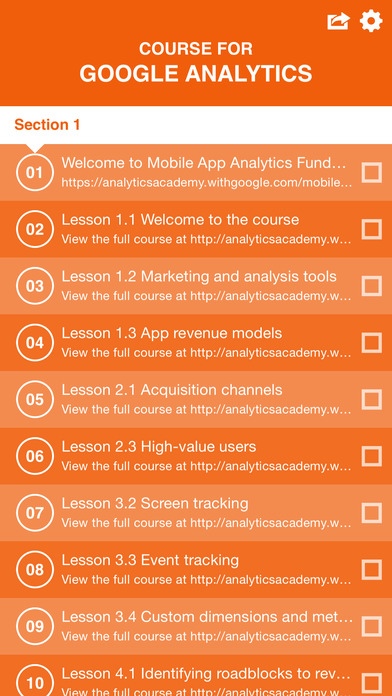
Lecture 01. Welcome to Mobile App Analytics Fundamentals
Lecture 02. Lesson 1.1 Welcome to the course
Lecture 03. Lesson 1.2 Marketing and analysis tools
Lecture 04. Lesson 1.3 App revenue models
Lecture 05. Lesson 2.1 Acquisition channels
Lecture 06. Lesson 2.3 High-value users
Lecture 07. Lesson 3.2 Screen tracking
Lecture 08. Lesson 3.3 Event tracking
Lecture 09. Lesson 3.4 Custom dimensions and metric tracking
Lecture 10. Lesson 4.1 Identifying roadblocks to revenue
Lecture 11. Lesson 4.2 Re-engaging existing users
Lecture 12. Lesson 4.3 Remarketing to new users
Lecture 13. Lesson 4.4 Course summary
Lecture 14. Analytics Academy Unplugged with Fontaine Foxworth
Lecture 15. Course introduction
Lecture 16. Lesson 1.1 Course overview
Lecture 17. Lesson 1.3 Reporting vs. analysis
Lecture 18. Lesson 1.4 Understanding segmentation
Lecture 19. Lesson 3.6 Course summary
Lecture 20. Lesson 3.1 Enhanced Ecommerce overview
Lecture 21. Analytics Academy Live with Justin Cutroni & Adam Singer
Lecture 22. Analytics Academy Live with Justin Cutroni & Marcia Jung
Lecture 23. GA in 60 Seconds: Linking AdWords & Analytics
Lecture 24. GA in 60 Seconds: Find the Best Keywords
Lecture 25. GA in 60 Seconds: Improve Location Targeting
Lecture 26. GA in 60 Seconds: Find Poor Performing Campaigns and Keywords
Lecture 27. GA in 60 Seconds: Placement Targeting
Lecture 28. GA in 60 Seconds: Using Site Search
Lecture 29. GA in 60 Seconds: Segment AdWords Traffic
Lecture 30. Optimizing AdWords with Google Analytics
Lecture 31. Introducing the New Version of Google Analytics
Lecture 32. Exciting Insights with Light Speed Analysis
Lecture 33. Measuring Multi-Channel Media
Lecture 34. Optimizing AdWords & Search
Lecture 35. GA for Display & Social Insight
Lecture 36. Measuring Customer Engagement
Lecture 37. GA in 60 Seconds: Tracking Ecommerce with Google Analytics
Lecture 38. GA in 60 Seconds: Identifying High Spenders
Lecture 39. GA in 60 Seconds: Conversion Funnels
Lecture 40. GA in 60 Seconds: Using Site Search
Lecture 41. Welcome to Google Analytics Platform Principles
Lecture 42. Lesson 1.2 The platform components
Lecture 43. Lesson 1.1 Course overview
Lecture 44. Lesson 1.3 The data model
Lecture 45. Lesson 2.1 Data collection overview
Lecture 46. Lesson 3.1 Processing & configuration overview
Lecture 47. Lesson 2.2 Website data collection
Lecture 48. Lesson 3.2 Processing hits into sessions & users
Lecture 49. Lesson 2.3 Mobile app data collection
Lecture 50. Lesson 3.3 Importing data into Google Analytics
Lecture 51. Lesson 2.4 Measurement Protocol data collection
Lecture 52. Lesson 3.4 Transforming and aggregating data
Lecture 53. Lesson 4.1 Reporting overview
Lecture 54. Lesson 4.2 Building reports with dimensions & metrics
Lecture 55. Lesson 4.3 The reporting APIs
Lecture 56. Lesson 4.4 Report sampling
Lecture 57. Frame Your Data in the Context of Your Business
Lecture 58. Use Segments to Analyze Your Data
Lecture 59. Macro and Micro Conversions
Lecture 60. Use Goal Flow to Measure the Conversion Process
Lecture 61. The Different Types of Goals You Can Use in Analytics
Lecture 62. How Your Channels Drive Sales and Conversions
Lecture 63. Analyzing Your AdWords Traffic
Lecture 64. AdWords Placements Report
Lecture 65. AdWords ROI
Lecture 66. AdWords Day Parts Report
Lecture 67. Realtime Reports
Lecture 68. Emailed Reports
Lecture 69. Site-Search Reports
Lecture 70. Social Reports
Lecture 71. Traffic Sources Reports
Requires iOS 8.0 or later. Compatible with iPhone, iPad, and iPod touch.
About Course for Google Analytics
The company that develops Course for Google Analytics is Thai Nguyen. The latest version released by its developer is 1.0.
To install Course for Google Analytics on your iOS device, just click the green Continue To App button above to start the installation process. The app is listed on our website since 2015-11-04 and was downloaded 0 times. We have already checked if the download link is safe, however for your own protection we recommend that you scan the downloaded app with your antivirus. Your antivirus may detect the Course for Google Analytics as malware if the download link is broken.
How to install Course for Google Analytics on your iOS device:
- Click on the Continue To App button on our website. This will redirect you to the App Store.
- Once the Course for Google Analytics is shown in the iTunes listing of your iOS device, you can start its download and installation. Tap on the GET button to the right of the app to start downloading it.
- If you are not logged-in the iOS appstore app, you'll be prompted for your your Apple ID and/or password.
- After Course for Google Analytics is downloaded, you'll see an INSTALL button to the right. Tap on it to start the actual installation of the iOS app.
- Once installation is finished you can tap on the OPEN button to start it. Its icon will also be added to your device home screen.
Program Details
System requirements
Download information
Pricing
Version History
version 1.0
posted on 2015-11-04
Disclaimer
Official App Store Link
We do not host Course for Google Analytics on our servers. We did not scan it for viruses, adware, spyware or other type of malware. This app is hosted by Apple and passed their terms and conditions to be listed there. We recommend caution when installing it.
The App Store link for Course for Google Analytics is provided to you by apps112.com without any warranties, representations or guarantees of any kind, so access it at your own risk.
If you have questions regarding this particular app contact the publisher directly. For questions about the functionalities of apps112.com contact us.
